 Nov 4, 2024
How we name things
What’s in a name? Well, a lot, but first and foremost: stress. Whether we’re naming our babies, pets, companies, or features, we tend to worry a lot about finding the perfect name. We know intuitively that a name will shape how something is perceived and even influence its direction going forward. And yet, this stress isn’t equally distributed. In business, people tend to think a lot about the names of the companies they’re building but leave each product and feature name up to whoever thinks of the best-sounding name first.
 Aug 26, 2024
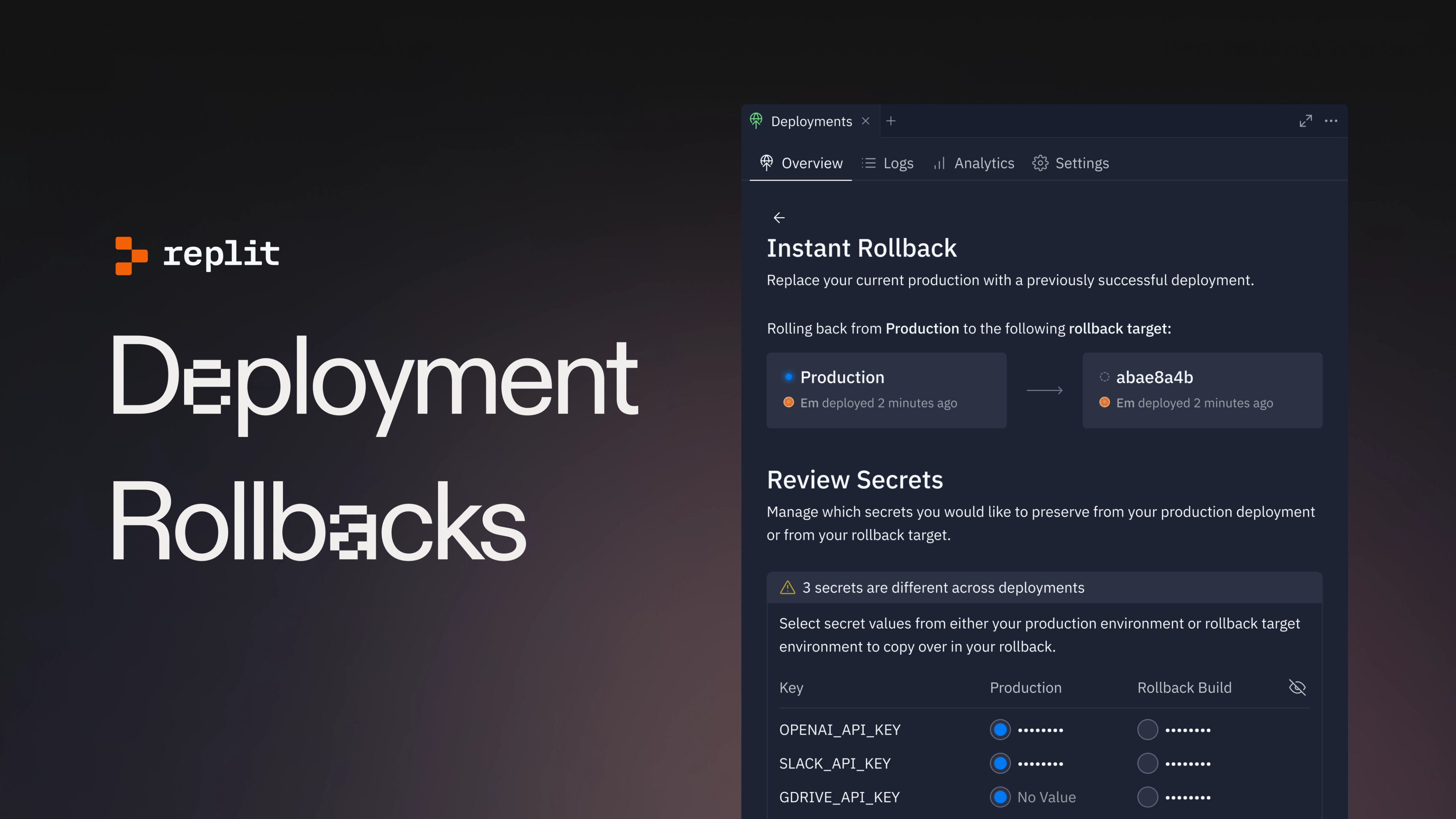
Introducing Deployment Rollbacks
Deployment rollbacks are a new feature that allow you to quickly and confidently version your deployments. Rollbacks allow you to restore a previous successful deployment in one click: fix a broken build or a typo in seconds. A quick tour Let’s explore the new additions to the deployment experience. Rollback activation
 Aug 20, 2024
Rebranding Replit: Inspiration to Action
At Replit, AI isn’t merely a footnote to our work. Our mission is to democratize software development, and AI is a step change in our ability to do so. The scale of this change was so significant—both for our company and the industry at large—that we realized we had to explore and refine the Replit brand. We had a lot to say in a market that was becoming increasingly noisy. But we had a problem: The previous design didn’t quite capture the history of our industry or our company, and our brand needed to demonstrate both to communicate a compelling perspective. As we refined, we worked from two parallel histories: The history of Replit and the progress we’ve made helping software creators go from idea to software, and the history of computer science and the progress the entire industry has made, ranging from the earliest mainframes to the most powerful LLMs. We planted our starting point years before Replit was founded As we’ve built Replit, from its earliest versions to our current AI features, we benefited from the work of people before us. There’s a confidence and humility to knowing this, that we’re proud of our work and grateful for the work that made it possible, that we wanted to translate into our brand.
 Feb 22, 2024
Experiment: Figma to Replit Plugin
Turn your Figma designs into functional web apps with the new Figma to Replit plugin—streamline your design-to-code workflow and go from prototype to production in minutes.
 Mar 19, 2023
An update to cover pages
We're excited to announce that Replit rolled out a big visual update to cover pages last week. With this update, Repl content comes first more than ever before. Everything else is now off to the side, allowing for a cleaner and more focused app experience. Our goal with this update is to improve the user experience for both creators and visitors of Replit projects. Two key improvements come with this update:
 Oct 12, 2022
Discuss code in context with Inline Threads
Part of what makes Replit so exciting to us is our community. We're always looking for new ways to help our creators connect, collaborate, and create something great together. When you're coding a great idea, we want to help you stay in creative flow, without being isolated from your friends or team. Since their introduction in 2021, Threads have been important for collaborative creation on Replit, especially for educators and students. Today, we're excited to release a new version of Threads and Chat. There's something in this release for everyone: from hobbyists and hackers, to students and educators, to teams and professionals. What's a thread?
 Oct 3, 2022
Replit's New Logomark
You may have noticed that Replit's logo looks a little different than it did last week. In summary: we're using what we call the "prompt" we already use elsewhere as our primary symbol. The prompt gives you an empty canvas, full of possibility, for you to start creating. We want Replit to be the same for your software creation journey! Let's dive in and learn why. We've had our old logo for a long time. The symbol (loopy, or hurricane, or ripple, or whatever else you call it) has served us well, but for a few reasons we wanted to simplify how Replit is represented:
 Aug 10, 2022
A Tale of Two Tabs
Today we're launching a long-awaited feature in the Workspace: Tabs! Yes, you can finally: Open two files side by side Open as many shells as you'd like Remove tools you don't need to use
 Aug 4, 2022
My Experience as a Replit Design Intern
Hi! Hi! My name is Clément, aka Bookie0, and I'm a 15 year old high school student from New York City. This summer, I had the awesome experience of being one of Replit's first Design interns! In this blog post, I'm going to talk about what I did and accomplished as well as what I've learnt during my internship. What I accomplished As an intern, you might think that my role was to just sit around all the time and observe the team do stuff – that was part of what I did, but most of the time I was actually actively working on real-world problems. So, what did I do exactly? As a designer, part of my role was to design Replit's interface: this means choosing where elements (like text, buttons, icons) are placed, the layout of a page, what colors to use, and much more.
 Oct 25, 2021
Design Systems @ Replit: Better Tokens
Part 1 of a series about our evolving design system, RUI (Replit User Interface). Replit is growing fast, as an application and a team. New features are being added, new people are joining the platform, and new designers and engineers are building it all. Unfortunately, this means that different parts of the product start to look and behave differently, because no single designer or engineer can keep all the interface states in their head. With dozens of people working on Replit, what happens when you want to update your color or text scheme across the whole site? What if you want users to be familiar with how components work anywhere they see them? It doesn't happen by accident — it requires strong infrastructural basics that you can rely on. So, we spent a few months this year building a stronger foundation for our design system. This is how our system is structured now:
 Oct 4, 2021
Enter the Shadows with Dark Mode
Looking for how to change your Replit theme? Click here. It's spooky season, so we have a spooky feature for you: Dark Mode™ is now available for everyone on Replit! Just open your sidebar and click the moon to enter the shadow realm. Click the sun to switch back. Dark theme will work across the app — from the homepage,
 Apr 22, 2021
A whiteboard for every repl
Replit is a place where beginners, educators, and professionals alike can code and share their ideas collaboratively. Something that goes hand and hand with your source code is how you communicate it. We built threads, which allow you to leave contextual messages around code, and added better markdown support for READMEs and other guides. However, we were missing a visual way for people to explain and collaborate around code. Today we're excited to announce support for draw files, powered by excalidraw! Any new file with the .draw extension will become a whiteboard to sketch shapes, draw freely, and add text. These files are multiplayer by default, anyone who joins your repl will be able to sketch and diagram along with you. During this period of remote collaboration, we've used draw files to sketch out problems with candidates during interviews, to diagram how our internal systems work, and to quickly prototype user flows. How it works Thanks to the awesome open source excalidraw project, we were able to combine their library with our infrastructure to treat .draw files just like any other file in your repl. We use the same file structure under the hood, which makes importing from excalidraw a breeze (just save your work on excalidraw.com with a .draw extension and upload it to Replit).
 Dec 28, 2020
Tabbed Shell
Among the many things that makes Repl.it special is our ability to provide free compute to millions of users. We've built a platform that not only lets you write and run code, but also gives you access to a Linux container through which you can execute arbitrarily complex commands. Despite being such a powerful feature, we haven't done a great job of exposing that capability to its fullest. Today, we're excited to announce that we're rolling out a redesign of the shell as a separate tab next to the console. Although we've already had a shell, this new redesign helps make it a more integral part of the experience in a repl. Here's what it looks like: Now it'll be easier than ever to switch between viewing your program's output in the console and executing bash commands in the shell. This will also greatly benefit beginners that are new to Linux since it will expose them to an easy to use shell that they can play around with in any repl. Note that you can still use the existing keyboard shortcut (Cmd/Ctrl + Shift + S) to open and focus the shell in addition to the new tab UI. If you have any comments or feedback, please let us know on Canny. We'd love to hear it!
 Apr 17, 2020
Bringing Repl.it's Marketing to the Modern Age
If you've been on the Repl.it landing page recently, you may have noticed a bit of a change! We spent a few weeks revamping our marketing pages and wanted to share a few words about how it went. A lot of design and engineering iteration went into not only making our new pages look great, but also creating a scalable and maintainable system. Our process Motivation & setup Naturally there were a lot of questions about where to start this redesign: the tone and voice of our copy? The visual style? The product we were advertising? Where the product was going to be in a few months? Ultimately this project was primarily motivated by growth and product education. For example, our previous landing page led with "Get your ideas out there", which is a great message and definitely part of our vision, but says nothing specific about the product. We wanted to approach the redesign not only as an opportunity to refine our visual and brand identity, but to get Repl.it out to millions more people and make the product dead-simple to understand.
- Jul 28, 2016
Vagueness to Clarity
Simple design is not only how the product looks like, but more importantly, how the product functions; it’s about creating the easiest and simplest path for the user to accomplish their goal. Usually, simple design comes from complex requirements and a lot of ideas — in order to break it down I usually go through a process that I call Vagueness to Clarity[](preview end). This process requires a deep understanding of the problem to come up with the best possible solution. Most people don’t pay attention to simple products because it feels so right and intuitive when using them — it could be so frictionless to the point that nothing gets in the way of accomplishing the main goal. But simplicity is hard — it maybe counterintuitive that the cleaner the interface, the more thoughts were put into it, and the longer it went through the Vagueness to Clarity process. From vague to complex