
 Apr 28, 2021
Why We Built Our Own DNS Infrastructure
This post is part of a series about the wonderful world of clusters. Check out the first post for an overview of what clusters are all about. In this post we will take a peek under the hood of our hosting infrastructure and walk through how we made hosting work in a multi-cluster world. Hosting overview If you didn't already know, you can host web servers right on Replit.com. Just create a new repl and spin up a web server using Flask, Express, or your favorite web framework. We automatically detect the web server and open a webview in the workspace. Your repls are automatically accessible via a *.repl.co domain and usually looks something like <repl name>.<user>.repl.co. In fact, this blog is hosted on a repl. On the backend, a proxy service handles proxying HTTP requests to the proper repl based on the host (domain name) of the request. This service shares a database with the container management service so that it knows which repl container to proxy HTTP requests to. Pre-Clustered World Our pre-cluster hosting setup was rather simple, we ran multiple instances of our proxy service behind a single load balancer. The load balancer had a single static IP address; both repl.co and *.repl.co had an A record with the static IP address of the load balancer. For an intro to DNS, check out howdns.works
- Mar 26, 2021
Welcome to the Wonderful World of Clusters
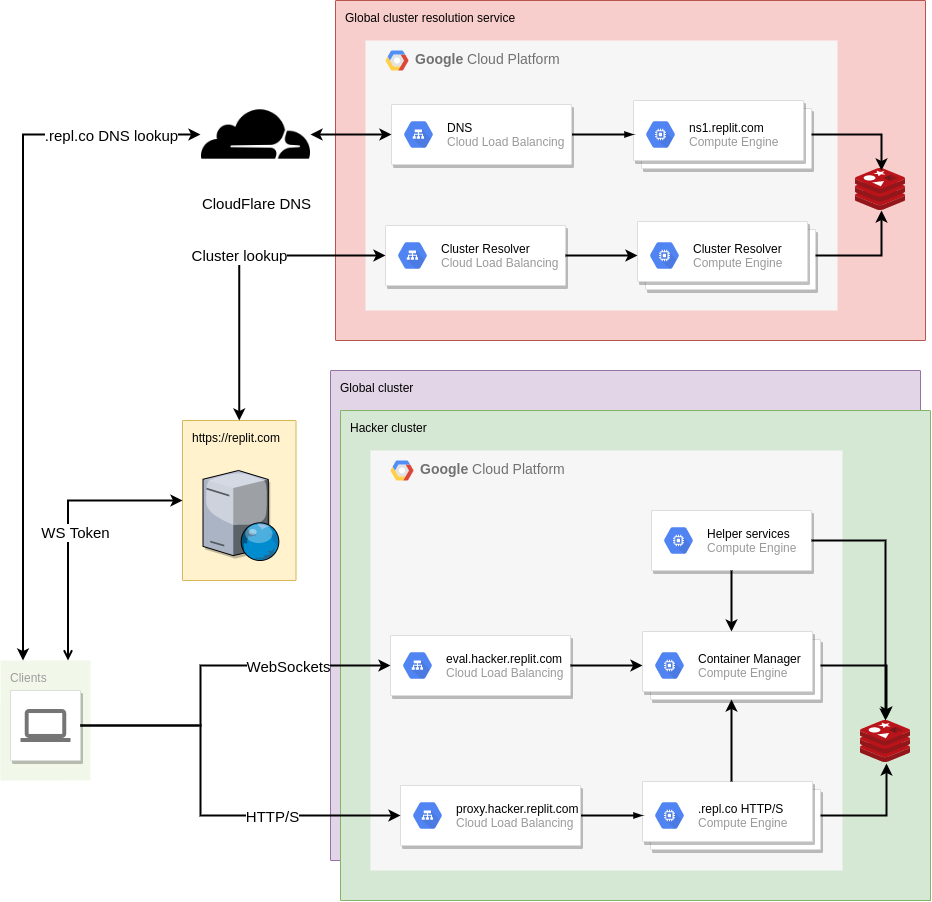
Having a solid foundation is critical for us to be able to fulfill our mission of making programming more accessible, more creative, and more fun. We did a great job of making the platform more stable during last year, but every now and then we would still run into unforeseen problems that cascaded into other parts of the platform, producing a bad experience for everyone. So back in October (just a few weeks after I joined the team) when we had 2 load-related site-wide outages within a week, we knew it was time to do a major overhaul of how our infrastructure handles traffic. And now today, we're announcing that as a side effect of that infrastructure change, Hacker repls now run in newer, more powerful machines, which means that we'll have more room to grow and experiment with more benefits for Hackers (and you might find that things feel a little bit snappier lately). This is the first of a three-part series of blogposts on how we rebuilt our infrastructure over the course of ~5 months. Introducing a new failure domain The original goal of this endeavor was simple, in theory: split the Replit infrastructure into multiple failure domains, so that when (not if) the next incident occurs, it only affects a subset of the users instead of all of them. There are multiple strategies to do so, and we chose to move Hackers to their own failure domain. But what does this split entail? Prior to this change, our backend infrastructure was relatively simple: a Google Compute Managed Instance Group of VMs that run containers, and another one that serves HTTP traffic on .repl.co domains. So in theory if we take the right-hand side of the diagram and make multiple copies of it, treating each one as a completely independent cluster, we solve the problem. Mission accomplished, right? Not quite: clients now need to know where to make their requests to, since they will now need to hit different hostnames depending on which cluster their repls are (since they are now completely independent after all). Clients that wanted to connect to their repl through the workspace were already required to contact the replit.com web server to get an auth token for the WebSocket connection anyways, so it would make sense for the web server to be the source of truth about the repl->cluster mapping. But what about hosting? All repls get a .repl.co domain, and users can CNAME them to be able to get to their app. At this point, the problem started looking very DNS-shaped, and that's kind of what we ended up doing: an external cluster resolution service, that can be used by both the Replit.com web server and individual clients trying to access their apps!
- Mar 19, 2021
Introducing the Python package cache
Figuring out how to install third-party libraries can derail people from learning to code or starting a new side project. We built the Universal Package Manager (UPM for short) to save people from having to think about package installation at all. Just import the library, press run, and UPM will install it into your repl! Every time you run a repl or a repl wakes up, UPM checks to see if it needs to download and install any dependencies. This is handy (no matter what's gone inside your repl, it will always have the dependencies it needs) but slow: UPM needs to download typically tens of megabytes worth of packages, extract them on the local filesystem, and sometimes also pre-compile them for better runtime performance. Or at least it used to be slow until yesterday when we enabled the Python package cache, so now the most popular Python packages are pre-populated in pip's cache (/home/runner/.cache/pip), so the download step is going to be mostly gone for the vast majority of Python repls! It also uses pre-built wheels as much as possible to avoid even having to pre-compile code. How does it work? We had two goals in mind when we started designing this: it should be as transparent as possible, which meant that users would still be able to add packages to the local cache while avoiding copying files around (which would have defeated the purpose of using a cache in the first place), and
 Jan 31, 2021
Killing Containers at Scale
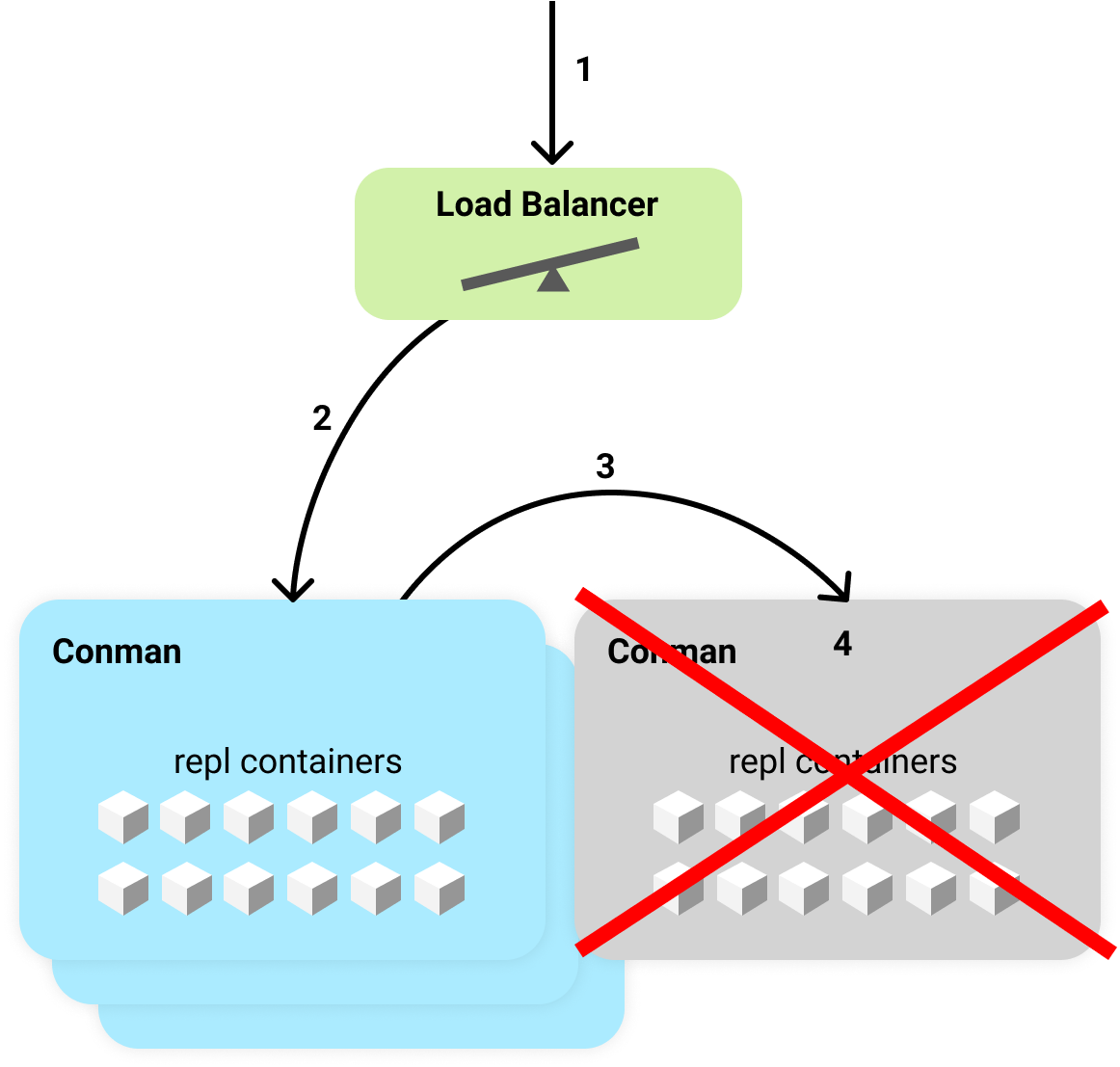
To make it so that anyone with a web browser can code on Replit, our backend infrastructures runs on preemptible VMs. That means the computer running your code can shutdown at any time! We've made it really fast for repls to reconnect when that happens. Despite our best efforts, though, people had been seeing repls stuck connecting for a long time. After some profiling and digging into the Docker source code, we found and fixed the problem. Our session connection error rate dropped from 3% to under 0.5% and our 99th percentile session boot time dropped from 2 minutes to 15 seconds. There were many different causes of stuck repls, varying from: unhealthy machines, race conditions that lead to deadlock, and slow container shutdowns. This post focuses how we fixed the last cause, slow container shutdowns. Slow container shutdowns affected nearly everyone using the platform and would cause a repl to be inaccesible for up to a minute. Replit Architecture Before going in depth on fixing slow container shutdowns, you'll need some knowledge of Replit's architecture. When you open a repl, the browser opens a websocket connection to a Docker container running on a preemptible VM. Each of the VMs run something we call conman, which is short for container manager. We must ensure that there is only a single container per repl at anytime. The container is used to facilitate multiplayer features, so its important that every user in the repl connects to the same container.
- Sep 20, 2020
Focusing on a solid foundation
At Repl.it, our mission is to make programming more accessible, more creative, and more fun. A place away from the modern software development grind. It’s an ambitious mission, and it's already resonated with millions of coders who followed their creative energy to build great apps, like repl.email, a free email service built and hosted entirely on Repl.it and available to anyone with a Repl.it account. Repl.it has grown so much in the past few years: To give you an idea of the scale we're operating on, we now serve 120k concurrent containers. That is 120,000 computers started at once We doubled our team every year for the past 4 years: 2^4 = 16, and are still hiring Repl.it went from a simple online REPL to a world-leading collaborative coding environment focused on learning and prototyping However, with growth comes problems: